
NumPy#
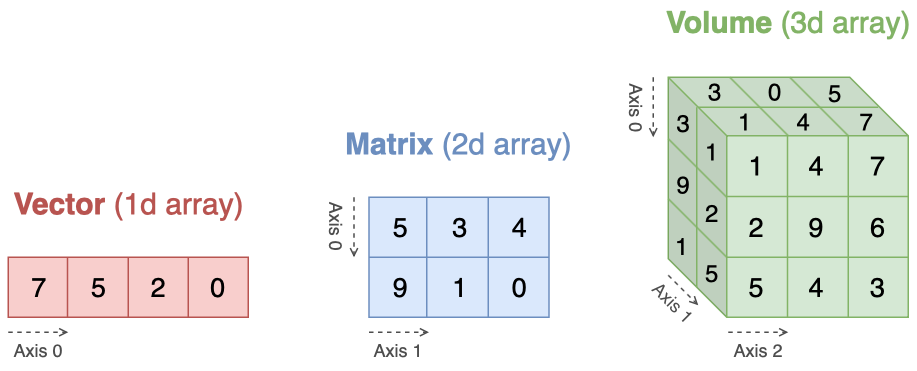
NumPy is the fundamental package for scientific computing in Python. It provides a powerful multidimensional array, along with an assortment of efficient functions for performing mathematical, logical, and statistical operations. By the end of this chapter, you should be able to:
describe an array using its shape, number of dimensions, size, and dtype;
reshape, index, and combine arrays while reasoning about views and copies;
apply broadcasting and reductions without unnecessary Python loops;
express common linear-algebra operations with shape-safe vectorized code.
Why NumPy?
As a simple example, consider the case of multiplying each element of a sequence with the corresponding element in another sequence of the same length. If the data are stored in two Python lists, we could iterate over each element, as follows.
a = [1,2,3]
b = [4,5,6]
c = []
for i in range(len(a)):
    c.append(a[i] * b[i])
This produces the correct answer, but if a and b each contain millions of numbers, we will pay the price for the inefficiencies of looping in Python. We could accomplish the same task much more quickly in C. This saves all the overhead involved in interpreting the Python code and manipulating Python objects, but at the expense of the benefits gained from coding in Python.
At the core of NumPy package is a powerful array that allows us to perform mathematical operations in a “element-by-element” fashion via pre-compiled C code. This gives us the best of both worlds: the simplicity of Python, with the efficiency of C. The following code does what the earlier example does, at near-C speeds, but with the code simplicity we expect from something based on Python.
import numpy as np

a = np.array([1,2,3])
b = np.array([4,5,6])
c = a * b
This example illustrates one of the NumPy’s powerful features: the absence of any explicit looping in the code, also known as vectorization. The actual computation takes place “behind the scenes” in optimized pre-compiled C code. Vectorized code has the advantage of being more concise and easier to read.
Getting started
To start working with NumPy, we need to import the numpy package first.
import numpy as np
After the import, we can refer to NumPy’s functions through the prefix np.