
Operations#
NumPy provides a large panel of vectorized operations. Vectorization describes the absence of any explicit looping in the code. Operations are applied on every element of the involved arrays in optimized compiled code. This is a key difference from Python lists and makes NumPy well suited to scientific computing.
The output data type (dtype) follows NumPy’s type-promotion rules. Mixing integers and floating-point values generally produces a floating-point result. Choose dtypes deliberately and compare floats with np.isclose() or np.allclose() rather than exact equality.
import numpy as np
Binary operations#
Operations that involve two (or more) arrays are applied element-by-element. A new array is created and filled with the result.
a = np.array( [20, 30, 40, 50] )
b = np.array( [ 0,  1,  2,  3] )

c = a + b

print(c)
[20 31 42 53]
Two arrays can be combined element by element when their shapes are equal. Incompatible shapes raise a ValueError.
(NOTE: NumPy allows operations on arrays of different shapes IF they are “compatible”. This is explained in the broadcasting section.)
a = np.array([1, 2, 3])
b = np.array([2, 2])

try:

    a * b

except ValueError as error:
    print("Expected error:", error)
Expected error: operands could not be broadcast together with shapes (3,) (2,)
One exception to the above rule is given by operations between an array and a scalar.
a = np.array([1,2,3])
b = 2

c = a * b

print(c)
[2 4 6]
Logical operations are also supported in NumPy.
x = np.array([3, 5, 2, 1, 4, 2])
y = np.array([1, 4, 7, 2, 5, 2])

w = (x > 3) & (y <= x) # "&" --> logical AND
z = (x==2) | (y==1)    # "|" --> logical OR

print("w:", w)
print("z:", z)
w: [False  True False False False False]
z: [ True False  True False False  True]
Unary operations#
Operations that involve one array are applied on all the elements.
x = np.array([[1,3,1],[2,5,1]])

s = x.sum()

print(s)
13
Parameter: axis#
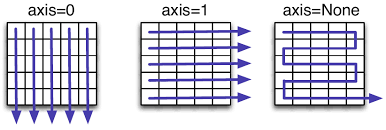
Most of the unary operations return a scalar, because they operate on the array as it were a list of numbers, regardless of its shape. By specifying the axis parameter, you can apply the “reduction” operation along the specified axis of an array. For example:
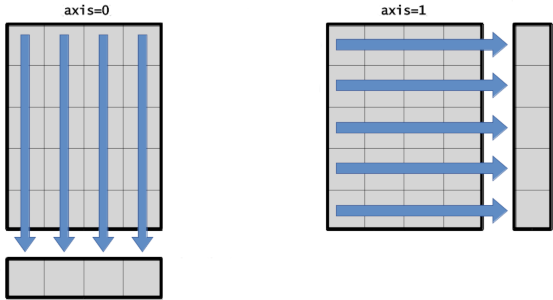
axis=0applies the operation along the row axis, in a column-by-column fashion.axis=1applies the operation along the column axis, in a row-by-row fashion.
col_sum = x.sum(axis=0)
row_sum = x.sum(axis=1)
print("----- x -----")
print(x, "-> shape:", x.shape)

print("\n----- x.sum(axis=0) -----")
print(col_sum, "-> shape:", col_sum.shape)

print("\n----- x.sum(axis=1) -----")
print(row_sum, "-> shape:", row_sum.shape)
----- x -----
[[1 3 1]
 [2 5 1]] -> shape: (2, 3)

----- x.sum(axis=0) -----
[3 8 2] -> shape: (3,)

----- x.sum(axis=1) -----
[5 8] -> shape: (2,)
Parameter: keepdims#
Note that reduction operations change the dimensions of the array: a matrix becomes a vector.
You can keep all the axes of the original array by setting the keepdims parameter to True.
A reduction along
axis=0gives a single-row matrix.A reduction along
axis=1gives a single-column matrix.
col_sum_keep = x.sum(axis=0, keepdims=True)
row_sum_keep = x.sum(axis=1, keepdims=True)
print("----- x -----")
print(x, "-> shape:", x.shape)

print("\n----- x.sum(axis=0, keepdims=True) -----")
print(col_sum_keep, "-> shape:", col_sum_keep.shape)

print("\n----- x.sum(axis=1, keepdims=True) -----")
print(row_sum_keep, "-> shape:", row_sum_keep.shape)
----- x -----
[[1 3 1]
 [2 5 1]] -> shape: (2, 3)

----- x.sum(axis=0, keepdims=True) -----
[[3 8 2]] -> shape: (1, 3)

----- x.sum(axis=1, keepdims=True) -----
[[5]
 [8]] -> shape: (2, 1)
Remark that the shape of the resulting array changes when you specify keepdims=True.
Broadcasting#
The term broadcasting describes how NumPy combines arrays with different shapes during arithmetics operations. As mentioned above, operations on two arrays are performed in an element-by-element fashion. In the most common case, the arrays must have exactly the same shape.
NumPy’s broadcasting rule relaxes this constraint when the shapes of two arrays meet certain constraints. The simplest example occurs when an array and a scalar value are combined in an arithmetic operation. The scalar is expanded to the shape of the array, and the operation is performed element by element. The general broadcasting rule is as follows.
Broadcasting rules
To determine whether two arrays are compatible for broadcasting, compare their shapes from their rightmost dimensions, moving left.
Two dimensions are compatible when they are equal or either one is
1.A missing leading dimension is treated as
1.The output uses the larger size in each position.
For example, (2, 3, 4) and (3, 1) are compatible and produce (2, 3, 4), whereas (2, 3) and (2,) are incompatible because their rightmost dimensions are 3 and 2.
If any pair is incompatible, the operation raises ValueError.
The following are common special cases of the trailing-dimension rule.
Scalars broadcast to any array.
Vectors broadcast to matrices with an equal number of columns.
Column matrices broadcast to any vector, and to matrices with an equal number of rows.
Broadcasting is conceptual: NumPy does not normally materialize repeated copies of the smaller array.
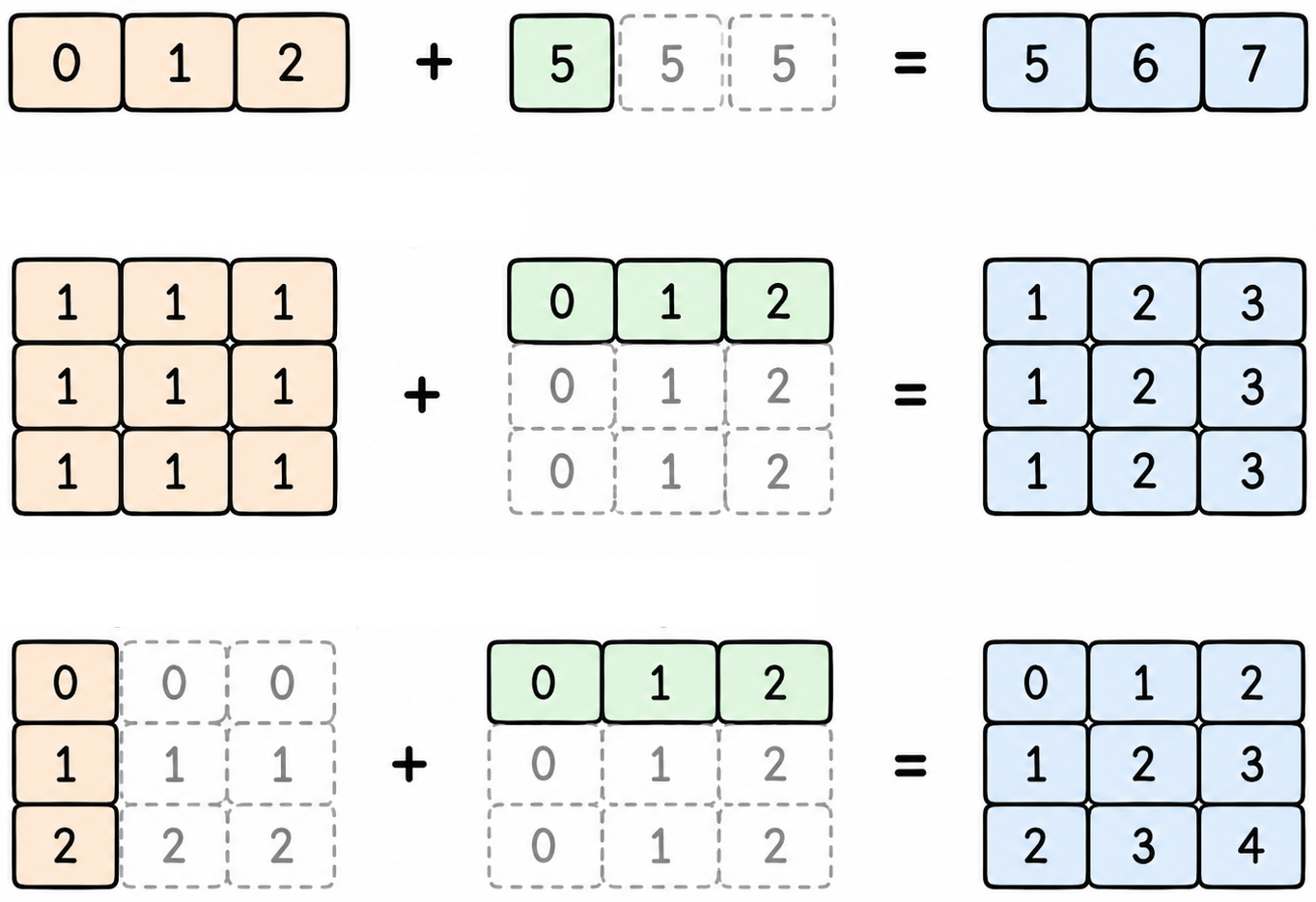
A common beginner mistake in NumPy is to inadvertently perform a binary operation with a single-column matrix of shape (N, 1) and a vector of shape (M,). Due to broadcasting, this produces an outer combination of shape (N, M): each element of the former is combined with every element of the latter.
vector = np.array([0,1,2])

column = np.array([[0],[1],[2]])

matrix = column + vector
print("----- vector -----")
print(vector)

print("\n----- column -----")
print(column)

print("\n----- column + vector -----")
print(matrix)
----- vector -----
[0 1 2]

----- column -----
[[0]
 [1]
 [2]]

----- column + vector -----
[[0 1 2]
 [1 2 3]
 [2 3 4]]
Exercises#
Solve the following exercises on array operations. Then, proceed to the next section.
Quiz 5#
Given an array
x, compute the following expression in a numerically stable way:\[ \log\left(\sum_{i=0}^{N-1} \exp(x_i) \right). \]
Useful functions:
\(\exp(\cdot)\) denotes the exponential, which can be computed in numpy with the function
np.exp().\(\sum_i \cdot\) denotes a summation, which can be computed in numpy with the function
np.sum().\(\log(\cdot)\) denotes the logarithm, which can be computed in numpy with the function
np.log().
Optional: Direct exponentiation can overflow for large values. Let \(m=\max_i x_i\) and use
Proof
Let \(m=\max_i x_i\). Then, we can write
Taking the logarithm of this expression gives
# This is the array to work with
x = np.array([7.1, -5.7, 13])

log_sum_exp = None # YOUR CODE HERE
Quiz 6#
Find the minimum and maximum values of a vector.
Hint:
# This is the vector to work with
vector = np.array([5, -1, 3, 12, 8, 0])

min_value = None # YOUR CODE HERE
max_value = None # YOUR CODE HERE
Quiz 7#
Compute the mean value of a matrix, of its rows, and of its columns.
Hint: .mean()
np.random.seed(1)

# This is the matrix to work with
matrix = np.random.randint(10,size=(3,4))

mean_all  = None # YOUR CODE HERE
mean_rows = None # YOUR CODE HERE
mean_cols = None # YOUR CODE HERE