
Preprocessing#
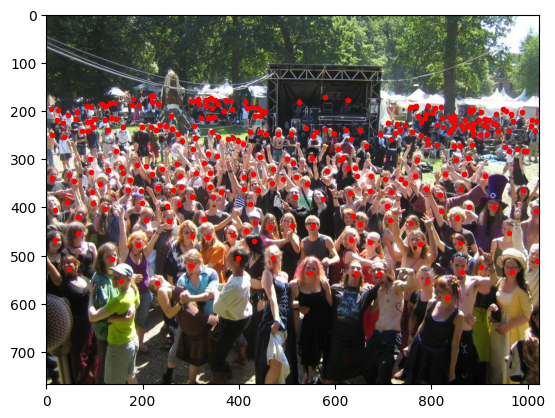
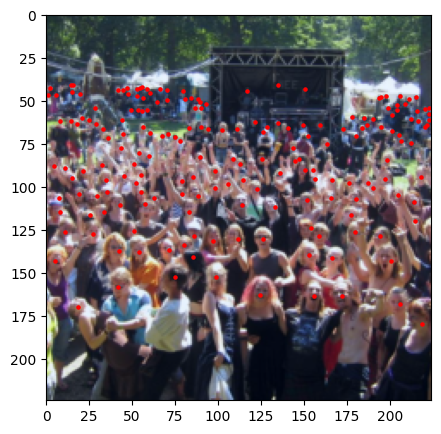
Neural networks require all images in a batch to have the same spatial dimensions for efficient processing. The actual dimensions vary based on the chosen pretrained backbone and the overall architecture, but common choices include 224x224, 384x384, or 512x512 pixels. However, real-world datasets like ShanghaiTech contain images with varying shapes and resolutions. Standardizing the image size through preprocessing is therefore essential. Equally important, head locations must remain perfectly aligned with the transformed images. Any resizing, cropping, or augmentation applied to the image must be mirrored in the point coordinates. Proper preprocessing ensures that both the images and their corresponding head annotations have been resized and aligned correctly, maintaining the integrity of the data.
Before (Image: 768x1024 - Heads: 298) |
After (Image: 224x224 - Heads: 190) |
|---|---|
|
|
Transform Pipeline#
To prepare data for P2PNet, you will design a joint preprocessing pipeline that transforms both the images and their associated point annotations. The transformation steps are as follows.
Resizing: All images are resized to a consistent target size. To preserve the aspect ratio, only the shorter side of the image is scaled to the target dimension (e.g., 224), with the longer side adjusted proportionally. The same scaling is then applied to the head-point coordinates to keep them in the correct positions relative to the new image dimensions.
Center Cropping: Images are then center-cropped to the desired final size (e.g., 224x224). Point annotations are adjusted accordingly by subtracting the appropriate offsets from their coordinates.
Filtering Points: After these transformations, any points that fall outside the boundaries of the processed image should be removed. This prevents training on invalid targets.
Type Conversion and Normalization: Finally, images are converted to floating-point tensors and normalized using the mean and standard deviation of the pretrained backbone, typically those of the ImageNet dataset (mean: [0.485, 0.456, 0.406], std: [0.229, 0.224, 0.225]). Point coordinates are converted to a floating-point tensor, but do not require normalization.
In summary, your preprocessing pipeline should ensure that each training sample consists of a uniformly sized image tensor and a corresponding set of accurately transformed point coordinates. This alignment is crucial for correctly training the P2PNet model.
Custom Collate Function#
Unlike standard image classification tasks, where each sample has a single label or a fixed-size target, crowd counting datasets such as ShanghaiTech contain images with varying numbers of head annotations. Each image may have a different number of people, so the set of point coordinates (targets) is not of uniform length across the batch. To handle this variability during batching, you will need a custom collate function for your DataLoader. This function ensures that images are stacked into a single tensor for efficient batch processing, while the targets (lists of head points) are kept as separate lists corresponding to each image. Here is an example of a custom collate function.
import torch


def collate_fn(batch):
    images, targets = zip(*batch)

    # Stack images into a single tensor
    images = torch.stack(images, dim=0)

    # Stack targets as a list
    return images, list(targets)
When creating your DataLoader, pass this function as the collate_fn argument.
dataloader = DataLoader(dataset, batch_size=..., collate_fn=collate_fn, ...)
This approach allows your DataLoader to handle batches where each image may have a different number of people, while still benefiting from the efficiency of batched image processing.
Checklist#
To summarize, ensure that your data pipeline:
Loads both images and point annotations correctly,
Applies all preprocessing steps consistently to both images and points,
Handles variable-length target lists with a custom collate function.
Attention to these details will prevent subtle bugs during training and evaluation. With your data pipeline complete, you can move on to implementing the P2PNet architecture itself.